Лучшая игра всех времён
-
 500+подписчиков
-
ПопулярностьТоп-2894
-
Постов5,145
-
Просмотров1,340,082
-
Подписок606
-
Карма автора+21,422
-

-

У меня тоже включено
-

парни а есть ли в айпокере ха столы? можно с них руки собирать трекером или нужен конвертер?
-

Если их не убрали то точно есть, там даже пару человек наживали беспощадно)
-
Блин ну это по истине неудачный месяц, на меня какой-то поляк обиделся, и теперь его единственный смысл жизни блочить мне позу на всех столах)
Чё с этой поеботой делать не пойму)
-

покер соул? Он как-то ни с того ни с сего пожелал мне лютого даунстрика. Через пару месяцев я с пика улетел на 9к. Он маг в третьем поколении, не шути с ним.
-
Да Серёг)
-
Да не маг он)) а просто обиженный жизнью человек. Но это неприятно на самом деле, и так не складывается и игра тухлая, как проклятый играешь ебаные рег вары весь день, а тут я теперь по кд ещё и без позы на каждом тейбл старте, он прям внимательно следит)
Ну пиздец прям не в тему это всё)
-

Nicedaybro, припугни его супермегапро, скажи, что он твоя крыша - сразу дисконетнется.
-

-

-
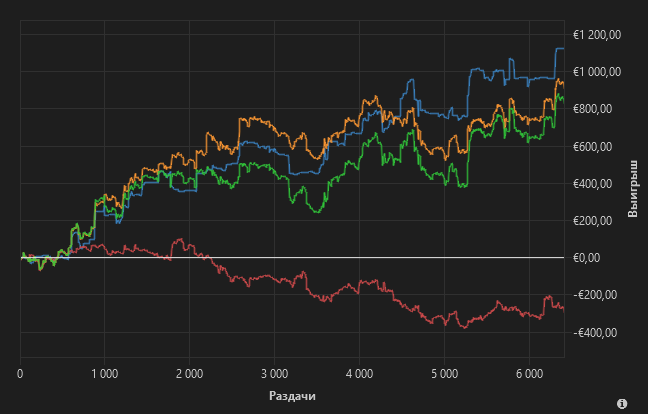
+ отмазка
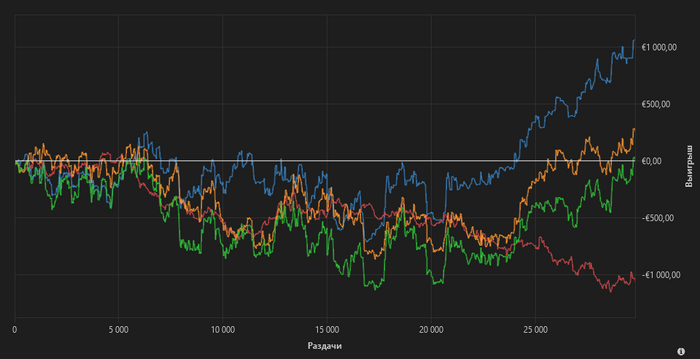
Пока онли старзы играю, реды всё никак починить не могут)
-
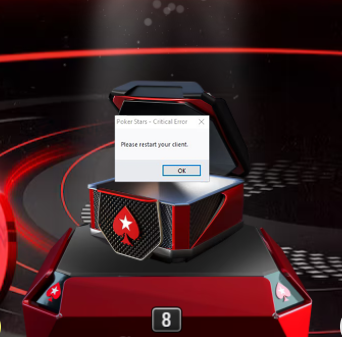
Обновил топ тильт. Короче я вчера как папа карло пытался насобирать нормально игру, как всегда всё было тухловато, но спустя часов 7 я наконец-то очутился на 4х, ЧЕТЫРЁХ хороших столах и как только поймал себя на мысли " бля как же аухенно", у меня крашнулся клиент, впервые за месяц.
После этого я зашёл обратно, столов разумеется нет и пошёл портить себя месяц))))
проебал 700$ за час.
Выключил, лёг, залипал в телефон с мыслями какой же я долбоёб. Сон обычно помогает какой бы не был плохой день, поспал и на утро всё проходит, единственное средство от тильта. Но впервые за долгое время я проснулся и первая мысль в голове "какой же я долбоёб"
-

Nicedaybro, жиза пздц
-

Nicedaybro, если это старзы, то тебе просто надо please restart your client, и больше не будет вылетать
-
Это какой-то злой рок, у меня 2 вечера подряд перед этим выключался дома свет, на 5 секунд, я терял игру, а вчера эта поебота)
-

я кстати переустановил клиент с удалением всех файлов по гайду - с 7 мая ни разу не крашился клиент, не гарантирую что поможет, но как минимум может их станет меньше. Там времени 10 минут занимает, главное сохранить все настройки предварительно.
Thank you for getting in touch with us, and we're sorry to hear you're experiencing issues.
Our log file review shows file corruption that's stopping our software from running correctly.
The good news is a clean reinstall of our software should resolve this issue.
You can back up essential files before removing our software and installing a new copy. Their filenames are:
Settings file: user.ini or user
Player notes: notes.user.xml (where 'user' is your username)
You'll only find the player notes file if you have saved notes or labels on other players at the poker tables. If you don't take notes on players, only make a copy of your settings file.
Step 1: Backing up files
Open our software (if possible) and follow these steps:
Help → Open My Settings Folder
Find the file(s) and copy them to a safe temporary location.
If you can't open the software, you can manually open the settings folder and find the file(s).
Press the Windows Key + R at the same time.
Type or copy/paste the text below into the area provided and press 'Enter':
%USERPROFILE%\AppData\LocalFind and open our software's folder.
Look for user.ini or user and notes.user.xml where applicable.
Copy the file(s) to a safe temporary location. The desktop is a good choice.
Once you have made a copy of those files, uninstall our software.
Step 2: Uninstall our software
Settings → Apps → Apps & Features
Use the search bar to find our software or scroll down the list, then choose our software and press the 'Uninstall' button.
Step 3: Deleting folders related to our software
Open the 'File Explorer' app.
Go to the 'C:' drive.
Enter the 'Program Files' or 'Program Files (x86)' folder, depending on which version of Windows10 you use.
Scroll down, right-click on our software’s folder and press 'Delete'.
Press the 'Windows Key' + 'R' at the same time.
Type or copy/paste the text below into the area provided and press 'Enter':
%USERPROFILE%\AppData\Local\Delete our software's folder.
Step 4: Reinstalling and restoring files
Once you uninstall our software, restart your computer. Next, download and install our software from here: [https://we.tl/t-yrhF8PIXOG (Temporary link that expires on the 7th May 2023)
When the installation is complete, log in and see if the issue remains before restoring the backed-up files.
To restore the file(s):
Help → Open My Settings Folder.
Close our software, then copy the file(s) back into the folder. If you get a pop-up asking you to overwrite files, accept.
-
Все мы немного далбоеб
-

-
timenow, Да впервые такая проблема возникла, если повторится ещё раз то думаю возьму)
- Вы сможете оставлять комментарии, оценивать посты, участвовать в дискуссиях и повышать свой уровень игры.
- Если вы предпочитаете четырехцветную колоду и хотите отключить анимацию аватаров, эти возможности будут в настройках профиля.
- Вам станут доступны закладки, бекинг и другие удобные инструменты сайта.
- На каждой странице будет видно, где появились новые посты и комментарии.
- Если вы зарегистрированы в покер-румах через GipsyTeam, вы получите статистику рейка, бонусные очки для покупок в магазине, эксклюзивные акции и расширенную поддержку.
Nicedaybro, Надо было писать не "старзы 100", а "скамина"