Back to the future.
Статистика
Статистика темы
-
ПопулярностьТоп-1116
-
Постов837
-
Просмотров42,374
-
Подписок5
-
Карма автора+1,463
Лучшие посты автора
Лучшие посты читателей
-
тащи говнотурик в говноруме
+1
-
Будучи мелким стоял на воротах за сборную школы, занимался чуток и моими кумирами были естественно Б
+1
-
Фалькао на данный момент лучший нападающий в мире(Роналдо и Месси не нападающие-они просто боги), ну
+1
-
это из цельнометаллической оболочки))
+1
-
Ну зачем ты делаешь гейский 3бет?
+1
-

-

-
а ну да, я тоже, помнится, на первом курсе проходил)тогда лучше не слать их)))зато потом от меня отстали аж до 2013))))
-
Cейчас с друзьями пойду играть кэш, нл50 копеек или нл1р
-
мы тоже играем,только лимитом повыше НЛ200=))серьезный такой лимит))
-
Скажите, пуш ошибка тут? Конечно к риверу у меня аутов много было. Повезло...
опп 69/17/9.9 на 78 рук.
No Limit Holdem Tournament
PokerStars
6 Players
Hand Conversion Powered by weaktight.com
$3.00+$0.30
Stacks:
UTG henkapperloo (9,859)
UTG+1 all soares (6,149)
CO Lyada (4,493)
BTN Datobbz (6,605)
SB sinev (2,625)
BB konrad59 (1,810)
Blinds: 75/150 Ante 20
Pre-Flop: (345, 6 players) sinev is SB
1 fold, all soares calls 150, 2 folds, sinev goes all-in 2,605, 1 fold, all soares calls 2,455
Flop: (5,480, 2 players, 1 all-in)
Turn: (5,480, 2 players, 1 all-in)
River: (5,480, 2 players, 1 all-in)
sinev says "sorr"
Final Pot: 5,480
all soares shows two pair, Kings and Tens - lower kicker
sinev shows two pair, Kings and Tens
sinev wins 5,480 (net +2,855)
all soares lost 2,625 -
Аут 269 при 192 итм за средний, обидно что проиграл фишу, а не сильному игроку.
No Limit Holdem Tournament
PokerStars
6 Players
Hand Conversion Powered by weaktight.com
$3.00+$0.30
Stacks:
UTG Daykinator (10,135)
UTG+1 robenanja (5,797)
CO all soares (22,280)
BTN EXXEL FOLDTY (6,960)
SB mmm0009 (17,762)
BB sinev (11,300)
Blinds: 250/500 Ante 60
Pre-Flop: (1,110, 6 players) sinev is BB
2 folds, all soares raises to 2,500, 2 folds, sinev goes all-in 11,240, all soares calls 8,740
Flop: (23,090, 2 players, 1 all-in)
Turn: (23,090, 2 players, 1 all-in)
River: (23,090, 2 players, 1 all-in)
Final Pot: 23,090
all soares shows two pair, Jacks and Nines
sinev shows two pair, Nines and Threes
all soares wins 23,090 (net +11,790)
sinev lost 11,300 -
в первой раздаче с таким стеком и лимпером с утг я бы фолдил либо возможно доставлял по шансам. я так понимаю это 6 макс за 3 бакса? вообще я в этих туриках предпочитаю не делать таких "резких" движений))
-
JimDiGriz28 @ 23.6.2011
в первой раздаче с таким стеком и лимпером с утг я бы фолдил либо возможно доставлял по шансам. я так понимаю это 6 макс за 3 бакса? вообще я в этих туриках предпочитаю не делать таких "резких" движений))
да 6макс за 3.30, предысторий с оппом много, выйгрыш по 10-хай и даме-хай, когда он лимпил, я на бб чекал и мы чекали до конца там были чтото типа 53о и 75о. В итоге вылетел против него же. -
sinev @ 23.6.2011
да 6макс за 3.30, предысторий с оппом много, выйгрыш по 10-хай и даме-хай, когда он лимпил, я на бб чекал и мы чекали до конца там были чтото типа 53о и 75о. В итоге вылетел против него же.
я на предыстории в этом турнире редко смотрю, играю минимизируя риски=)а А7 здесь большой риск вылететь, стек не такой уж маленький еще)вообще не люблю в этих туриках на стек выставляться с пограничными руками) -
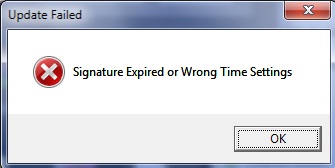
Пс выдаёт ошибку. Просто переустановить клиент?
-
я думал только у меня) написал в саппорт английский жду ответа)
с обновлениями намутили чтото, пофиксят думаю) -
-
-
-
Thank you for your email.
First, you should restart your computer and power off/on any network equipment you have connected (i.e. modem, router, access points or hubs). If this fails, check your system date/time (located on the Taskbar) to ensure the current date and year is set properly. Next, make sure if you have a firewall or similar software (i.e. proxy or websense filter/parental control) installed it is configured correctly to allow PokerStars to access the Internet.
If the above fails, please provide us with the exact error message you are receiving and let us know what firewall or security software is installed on your computer (i.e. CA Security, Kaspersky, Avast, AVG).
It would also be helpful if you send us the PokerStars program log files from your computer (PokerStars.log.0, PokerStarsUpdate.log.0, and PokerStarsCommunicate.log.0 if present). To send us the log files, you will need to manually locate them and attach them to an e-mail. Depending on your Operating System the logs will be located in different directories.
вот что прислал саппорт, все же думаю, не в моем компе дело, а у них самих=)))) -
-
Добор))
No Limit Holdem Tournament
PokerStars
6 Players
Hand Conversion Powered by weaktight.com
$2.00+$0.20
Stacks:
UTG UPayMyBilllz (2,730)
UTG+1 anglehart24 (3,730)
CO sinev (3,000)
BTN Kafko (3,300)
SB pokerkombat9 (2,780)
BB Bampe-roffes (2,920)
Blinds: 10/20
Pre-Flop: (30, 6 players) sinev is CO
2 folds, sinev raises to 60, Kafko calls 60, 2 folds
Flop: (150, 2 players)
sinev bets 100, Kafko calls 100
Turn: (350, 2 players)
sinev bets 250, Kafko calls 250
River: (850, 2 players)
sinev bets 650, Kafko raises to 1,320, sinev goes all-in 2,590, Kafko calls 1,270
Final Pot: 6,030
sinev shows three of a kind, Nines
Kafko shows two pair, Aces and Nines
sinev wins 6,030 (net +3,030)
Kafko lost 3,000 -
оооо, отлично, гасить таких надо слоуплееров=))))недавно от двоих аж пострадал))
-

1 человек читает эту тему (1 гость):
Зачем регистрироваться на GipsyTeam?
- Вы сможете оставлять комментарии, оценивать посты, участвовать в дискуссиях и повышать свой уровень игры.
- Если вы предпочитаете четырехцветную колоду и хотите отключить анимацию аватаров, эти возможности будут в настройках профиля.
- Вам станут доступны закладки, бекинг и другие удобные инструменты сайта.
- На каждой странице будет видно, где появились новые посты и комментарии.
- Если вы зарегистрированы в покер-румах через GipsyTeam, вы получите статистику рейка, бонусные очки для покупок в магазине, эксклюзивные акции и расширенную поддержку.
жееесть)
а вообще у тя ж отмаза есть, ты учишься=))так что шли их лесом=)